
Your health data should make sense.
Health records, symptoms, tests and appointments can become overwhelming. MSDR.AI brings scattered health information into one place, so you can understand your own story and talk to your care team with more than a guess.
Now onboarding a limited number of beta applicants. Already decided? Skip the pitch and sign in.
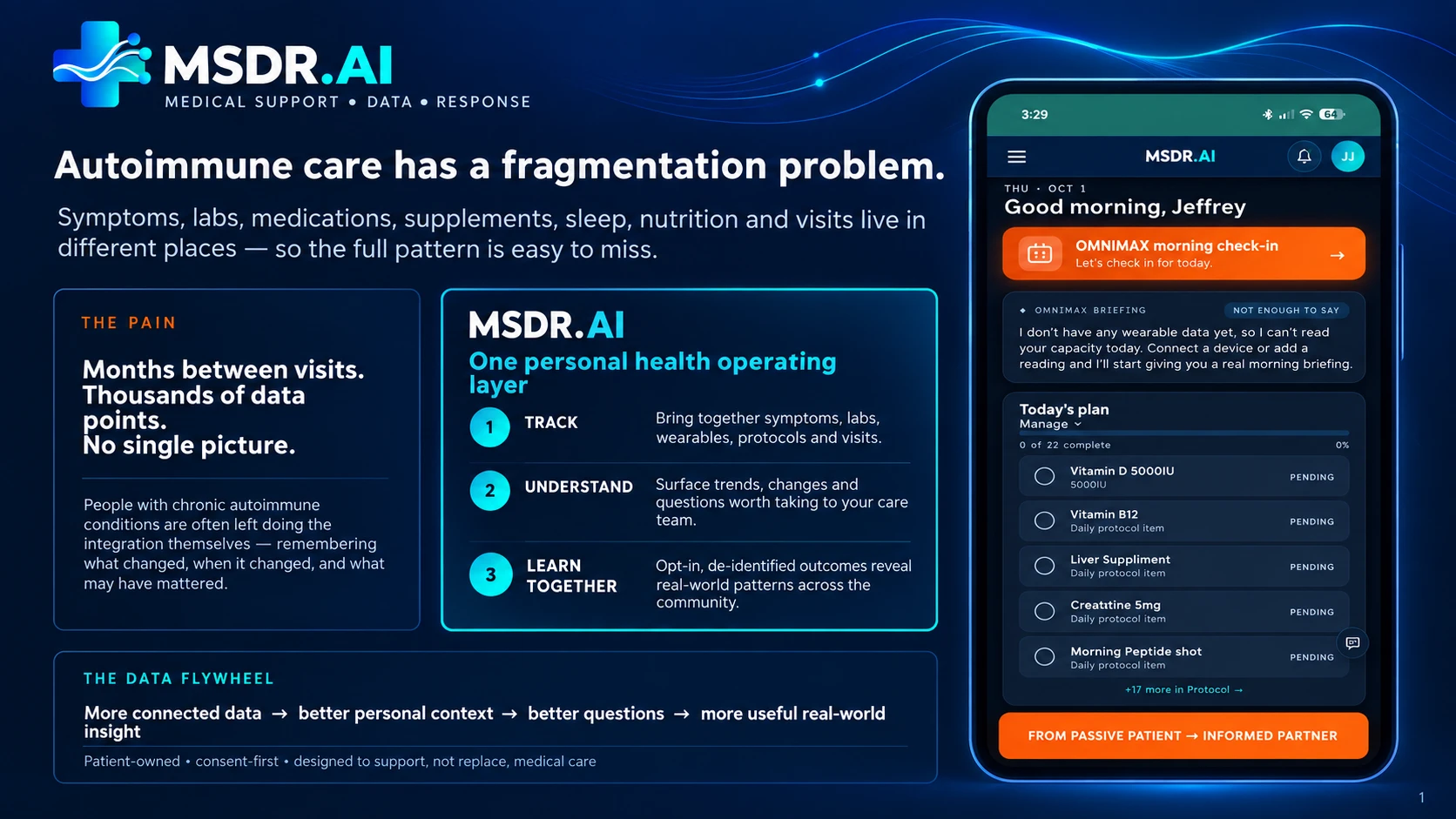
Autoimmune care has a fragmentation problem.
Symptoms, labs, medications, supplements, sleep, nutrition and visits all live in different places — so the full pattern is easy to miss. People managing a chronic condition end up doing that integration work themselves.
What that actually looks like
- Months between visits, while your condition changes every day in between.
- Labs in one portal, symptoms in your memory, meds on a sticky note.
- A wearable that collects data nobody — including you — ever looks back at.
- Walking into an appointment and forgetting the one thing you meant to ask.
Months between visits. Thousands of data points. No single picture.
Remembering what changed, when it changed, and what might have mattered is a full-time job on top of an already full-time condition. MSDR.AI exists to do that remembering for you.
More connected data. Better questions.
Track
Bring together symptoms, labs, wearables, protocols and visits in one place.
Understand
Surface trends, changes and the questions worth taking to your care team.
Learn together
Opt-in, de-identified outcomes reveal real-world patterns across the community.
Patient-owned · consent-first · designed to support, not replace, medical care.
One app. Every piece of your health story.
Tap any feature for a look inside.
Core health tracking
10 featuresEverything you log lives in one place, organized the way your care team would want to see it.
Common questions
What shows up on the MSDR.AI dashboard every day?
Today's protocol checklist, hydration tracked in 8-cup increments, your wearable data if one is connected, and an OMNIMAX morning briefing that reads your recent data before you even open the app.
Does the MSDR.AI dashboard work without a wearable device?
Yes. Without one connected, OMNIMAX says so directly — "I don't have any wearable data yet" — instead of guessing, and the rest of the dashboard still works from what you log yourself.
Does the dashboard show how many protocol items I've finished?
Yes — a live "X of Y complete" count sits right on the home screen next to the checklist, so adherence is visible at a glance, not buried in a separate report.
Common questions
How do you log symptoms in MSDR.AI?
Through OMNIMAX's Journal & therapy mode — you describe how you're doing in plain language and it becomes part of your health record, instead of filling out a separate multi-field form.
Is MSDR.AI's journal a chat or a form?
A chat. Journal & therapy is one of OMNIMAX's four conversation modes, so a daily check-in happens by talking, not by filling in fields.
Can I look back at past journal entries in MSDR.AI?
Yes — every Journal & therapy conversation is saved under Past Conversations with its date, so you can scroll back through prior check-ins whenever you want.
Common questions
What is the MSDR.AI Clarity Score?
A 0–100 score on the My Body page blending your check-ins, protocol adherence, sleep and recovery into one number — it reads 0 until enough real data has actually been logged.
How much data does MSDR.AI need before it shows a symptom trend?
At least two logged readings. The app says so directly — "one reading so far, a trend needs at least two" — rather than drawing a trend line from a single data point.
Does MSDR.AI track which symptoms come up most often?
Yes — My Body surfaces a Most-Noted Symptoms list, tags like fatigue, brain fog or headache, ranked by how often you've actually logged them.
Common questions
Does MSDR.AI show a history of symptoms over time?
Yes — a chronological event feed sits alongside your logged data; the automatic pattern-correlation layer on top of that history is still being built.
Can MSDR.AI find patterns across 30 days of symptoms on its own?
Not automatically yet. Today you (or OMNIMAX, in conversation) review the timeline yourself — a dedicated pattern-detection engine is explicitly labeled coming soon.
Why label the pattern engine coming soon instead of just shipping without it?
Because the event history is already real and useful on its own. The label exists so it's clear the automatic correlation layer isn't live yet — not to imply a feature that doesn't exist.
Common questions
What happens if I miss a day on my MSDR.AI protocol?
Nothing punitive — it resets simply: "You missed yesterday. No problem. Today we restart simple," with a suggestion to start with just the first few items.
Can I track exercise and supplements in the same checklist?
Yes — Protocol groups items by category, so Exercise and Supplements & Meds appear as separate sections on one list, each with its own check-off and streak.
Does MSDR.AI's protocol include guided workout sessions?
Some exercise items include a "Start guided session" button that walks you through the movement and lets you check it off when finished, instead of just naming the exercise.
Common questions
Does MSDR.AI read my step count from my phone?
No — a website can't read a phone's pedometer directly, so it shows no step data rather than inventing a number. Wearable-based step tracking is listed as coming soon.
How many guided movement sessions does MSDR.AI offer?
15 today, filterable by type — aerobic, strength, balance, flexibility, nervous system and recovery — from walking intervals to isometric holds like wall sits.
Does MSDR.AI warn about overheating during exercise?
Yes — Movement specifically notes that rising core temperature can temporarily worsen MS symptoms (Uhthoff's phenomenon) and treats overheating as a reason to stop, not push through.
Common questions
Can MSDR.AI tell me if an ingredient is safe to eat?
You can photograph an ingredient label or type it in, and OMNIMAX checks it against your medications, your personal avoid-list, your logged reactions and your current nutrition phase.
What is an avoid-list in MSDR.AI?
A personal list of foods you've flagged as triggering — tagged with a reason, like a specific food flagged for a medication interaction — that every future ingredient scan is checked against.
Does MSDR.AI track macros like protein and calories?
Only if you've logged that data yourself. It states outright that protein and calorie targets aren't shown when there's no macro data in your account, instead of guessing at numbers.
Common questions
Does MSDR.AI generate a report I can bring to my doctor?
A one-page weekly summary exists today. A fuller clinician-ready report is a listed coming-soon feature, not yet available.
What goes into MSDR.AI's weekly report?
The same week of logged data as the rest of the app — protocol adherence, symptoms and check-ins — summarized onto a single page.
Can I export my MSDR.AI report as a PDF?
That's part of the full clinician-report feature still in development. Today's weekly summary is viewable in-app.
Common questions
What file types can I upload to MSDR.AI?
Lab reports, imaging PDFs and medical records. The upload page automatically indexes and tags them by type — Labs, Imaging, Notes — so OMNIMAX can search them.
Does MSDR.AI read my uploaded lab results automatically?
Yes — uploaded files are indexed section by section and become searchable by OMNIMAX, which can reference specific values directly in conversation.
Can MSDR.AI summarize everything I've uploaded at once?
Yes, with a "Run deep research & analyze" pass that reads across your uploaded records, labs, journal entries and tracked data together and surfaces what stands out.
Common questions
Does MSDR.AI record doctor visits?
Yes — Visit Companion records audio directly in your browser and stores it in your private account.
Does MSDR.AI transcribe doctor-visit recordings?
Not yet. Recording and secure storage work today; automatic transcription and a plain-language summary are still being built, and the app says so directly on the page.
Is my MSDR.AI visit recording private?
Yes — recordings sit in your own private, encrypted account rather than a shared or public space.
OMNIMAX, your health co-pilot
6 featuresA second set of eyes on your own data — not a replacement for your care team, a way to show up to it prepared.
Common questions
What are OMNIMAX's four modes?
General chat for anything on your mind, Brain for analyzing your data, Protocol for building and adjusting it, and Journal & therapy for how you're doing — each opens its own separate thread.
Do I have to pick a mode before messaging OMNIMAX?
Yes, but switching is one click in the sidebar — each mode keeps its own conversation history, so changing modes doesn't lose or mix up a prior thread.
Which OMNIMAX mode should I use to ask about my labs?
Brain mode — it's built specifically to analyze your uploaded data and can cite real values from files you've added, rather than answering generically.
Common questions
Does OMNIMAX know what's in my uploaded medical records?
Yes — in Brain mode it reads across your uploaded sources (labs, imaging, notes) and can cite specific findings from them directly in a response.
How is OMNIMAX different from a generic AI chatbot?
A generic chatbot has no access to your files. OMNIMAX is grounded in your own uploaded records, logged history and profile before it ever answers a health question.
How many sources can OMNIMAX reference at once?
As many as you've uploaded — the chat view shows a live count ("Sources in your brain · 29," for example) and lets you expand the full list.
Common questions
What actually happens during OMNIMAX's deep-think pass?
It searches PubMed and Europe PMC for real studies, ranks them from systematic reviews and RCTs down to animal/mechanistic evidence, checks your medications for supporting safety signal, and has three separate AI models each take an independent read before the final answer is written.
Does OMNIMAX's safety check replace a real drug-interaction database?
No — there's no free, definitive interaction database left to call (the ones that used to exist are retired or paid-only now), so this is supporting signal only: medication name-matching plus real-world adverse-event frequency. It adds context; it doesn't replace pharmacist or physician review.
Is OMNIMAX's deep research pass unlimited?
No — it's capped monthly based on your plan. Regular conversational chat, by contrast, is unlimited on every plan.
Common questions
Can I talk to OMNIMAX instead of typing?
Yes — OMNIMAX supports voice input and voice replies, with a toggle in the chat window to turn voice replies on or off.
Does OMNIMAX show anything while it's listening?
Yes — a visual HUD appears while OMNIMAX is actively listening or responding, so it's clear when voice mode is live.
Can I turn off OMNIMAX's spoken replies but keep voice input?
Yes — voice replies and voice input are controlled separately, so you can speak your side of the conversation while reading its responses instead of hearing them.
Common questions
Can I log a meal without leaving the OMNIMAX chat?
Yes — inline actions let you add a food, log a check-in, or check off a protocol item directly from the conversation, no separate screen required.
What kinds of actions can OMNIMAX take inline?
Logging a symptom check-in, adding a food entry, and ticking off a protocol item are all built in today as inline, in-chat actions.
Why does MSDR.AI put logging inside the chat instead of separate forms?
Because most people stop using daily trackers that require a separate form every day — talking to OMNIMAX and having it log the entry removes that extra step.
Common questions
Can I send OMNIMAX a photo?
Yes — photo analysis is supported for added context, such as photographing a meal or an ingredient label during a conversation.
Does OMNIMAX forget old conversations?
No — every thread is saved under Past Conversations by mode and date, so you can reopen and continue any past conversation exactly where it left off.
Can I switch between an old thread and a new one?
Yes — starting a new conversation doesn't erase previous ones; all of them stay listed and reachable from the sidebar.
Devices & data
4 featuresBring in the numbers you're already collecting — no new hardware required.
Common questions
Which wearables does MSDR.AI connect to?
Three paths: Apple Health for Apple Watch and iPhone data, Health Connect for Samsung Health, Fitbit and other Android apps, and Garmin via its enterprise Health API.
Do I need a wearable to use MSDR.AI?
No — you can log a day's metrics manually on the Devices page, and that manual data feeds the exact same trends an auto-synced wearable would.
Is MSDR.AI's wearable sync automatic yet?
Partially. The integrations exist, but Apple Health and Health Connect need their own mobile apps to go live, and Garmin access is still pending program approval — manual logging is the current path for most people.
Common questions
How does MSDR.AI's weather flare warning work?
It checks your device's location against current conditions and only surfaces an alert when heat is actually likely to affect you — not as a generic daily weather widget.
Will MSDR.AI's weather warning notify me every day?
No — it stays silent on ordinary days and only appears when conditions cross a relevant threshold for flare risk.
Why does MSDR.AI warn about heat specifically?
Heat can temporarily worsen symptoms for many autoimmune and MS conditions (Uhthoff's phenomenon), so a location-based heat alert gives advance notice before that happens.
Common questions
What is the Daily Momentum Pulse in MSDR.AI?
A short, multi-step check-in — for example, rating where your energy "tank" is sitting as green, yellow or red — that prompts periodically through the app.
Can I skip MSDR.AI's pulse survey if I'm not ready to answer?
Yes — every step includes a visible Skip option, so a quick check-in never blocks you from using the rest of the app.
How long does MSDR.AI's pulse survey take?
It's built as a handful of quick, single-question steps rather than a long form — designed to take under a minute.
Common questions
Does MSDR.AI remind me about upcoming appointments?
Yes — you can add an appointment under Visits, and MSDR.AI prompts you to prepare for it ahead of time rather than just logging the date.
How does MSDR.AI keep appointment reminders accurate?
Reminders re-evaluate daily instead of being set once and forgotten, so they stay correct even as other logged data changes between now and the visit.
Can I add an appointment manually in MSDR.AI?
Yes — there's a direct "+ Add" control on the Visits page for entering an upcoming appointment.
Account & billing
3 featuresThe boring parts, done simply.
Common questions
What's shown on the MSDR.AI settings page?
Your profile and sign-in method, current subscription plan, usage against any monthly caps, and your health profile — including toggles like whether OMNIMAX reasons across all autoimmune conditions or just one.
Can I see my current MSDR.AI plan without contacting support?
Yes — Settings shows your active tier directly, alongside a usage counter for anything capped monthly, like deep-research passes.
Can I update my health profile after signing up for MSDR.AI?
Yes — the Health Profile section in Settings includes editable toggles, such as whether to reason across all autoimmune conditions rather than one, not just a one-time signup form.
Common questions
How much does MSDR.AI cost?
Plus is $20/month with 300 OMNIMAX chats, Pro is $100/month with near-unlimited chats, and a Founder VIP tier is a one-time $5,000 payment for lifetime access.
What counts against my MSDR.AI monthly chat limit?
Only research-backed answers — specifically supplement, dose and interaction questions that trigger a deep-research pass. Regular conversational chat with OMNIMAX is unlimited on every plan.
Can I cancel MSDR.AI at any time?
Yes — Settings includes a direct "Manage billing / cancel" link that opens a real Stripe customer portal, where you can cancel or change your payment method yourself, no support ticket required.
Common questions
Does MSDR.AI have a dark mode?
Yes — Settings includes an Appearance toggle between a warm cream light theme and a dark navy theme, switchable any time.
Can I change what OMNIMAX sounds like?
Yes — Settings lets you pick OMNIMAX's voice (the default is Fable, described as British and bright), then fine-tune speaking speed and pitch with sliders and preview the result with a "Hear it" button before saving.
Do my OMNIMAX voice settings carry over to my other devices?
No — voice customization is explicitly per-device, so a voice, speed or pitch choice made on one browser or phone doesn't carry over to another.
Questions we’d ask too
Is this going to replace my doctor?
No — and it isn't trying to. MSDR.AI organizes your health information and helps you understand your own patterns so the conversations you have with your care team are better ones. The decisions still belong to you and them.
I've tried trackers before and quit after a week.
Most trackers ask you to fill out a form every day. MSDR.AI is built around OMNIMAX instead — you can log a symptom or a meal just by talking to it, from the Dashboard, without opening a separate screen each time.
What if I don't have a wearable?
You don't need one. Journal, Protocol, Nutrition and Visit Companion all work from what you log yourself — a wearable adds more context, it isn't a requirement.
Is my health data actually private?
Your health data is isolated to your account by database-level Row-Level Security, so no other user can read or write your records, and uploaded files live in a private, per-user encrypted storage bucket. Nothing leaves your account for community-pattern features unless you opt in, and that data is de-identified first.
Is this only for MS?
MSDR.AI started from one person's experience with multiple sclerosis — but the problem it solves (data scattered across labs, symptoms, meds and visits) isn't unique to MS. It's built for anyone managing a chronic or autoimmune condition.
What does it cost?
Plus is $20/month, Pro is $100/month for the deeper OMNIMAX pipeline, and a Founder VIP tier is a one-time $5,000 payment for lifetime access.
Your data. Your call.
Patient-owned, consent-first
Your data is yours. Anything used to learn across the community is opt-in and de-identified first.
App Lock
An optional Face ID, fingerprint or passcode layer on top of sign-in, which re-locks automatically when you background the tab.
Walled off at the database level
Nobody else can ever see your records — not just blocked by the app, but enforced down in the database itself, the same way for every account.
Encrypted storage
Every file you upload sits in a private, per-user encrypted storage bucket — not a shared one.
Built to support, not replace, medical care
MSDR.AI organizes your information and helps you ask better questions. Your care team still makes the calls.
Born from MS. Built for better health.
MSDR.AI didn’t start in a boardroom. It started with one person trying to understand his own health — years of MRIs, symptoms, medications, lab results, appointments and questions, scattered everywhere.
The problem was never a lack of data. The problem was making sense of it.
What began with MS became something bigger: Medical Support, Data & Response — a system built to help you organize your health information, understand what matters, and communicate more effectively with the people caring for you.
Better questions start with better data.
Build your Health Brain and walk into every appointment prepared.
Now onboarding a limited number of beta applicants.